Chapter 7: Model Context Protocol (MCP) Justification
MIESC Integration with Artificial Intelligence Assistants
7.1 Introduction: The Human-Tool Interface Problem
7.1.1 Historical Context of Security Interfaces
Security analysis tools have evolved significantly in their technical capabilities over the past two decades, but their user interfaces have remained fundamentally anchored to the command-line paradigm inherited from early compilers and static analyzers. This disparity between internal sophistication and external accessibility represents a significant barrier to the adoption of security practices in software development.
Consider the typical workflow of a developer who wants to verify the security of a smart contract before deploying it:
- Install the tool (a process that may require resolving dependency conflicts)
- Learn the tool-specific command syntax
- Execute the analysis and capture output
- Interpret technical results (SWC codes, execution traces, SMT conditions)
- Investigate each finding to determine if it represents a real vulnerability
- Decide and apply the appropriate remediation
This process assumes specialized technical knowledge that exceeds the typical competencies of an application developer. The result, documented by Beller et al. (2016) in their large-scale evaluation of open-source projects, is that static analysis tools remain underused in practice because of usage friction and the difficulty of interpreting their results.
7.1.2 The Emergence of Conversational Interfaces
The appearance of large language models (LLMs) capable of maintaining coherent and contextually relevant dialogues opened a new possibility: using natural language as the primary interface for technical tools. Instead of learning specific commands, users could express their intent in everyday language and let an intelligent intermediary translate that intent into tool invocations.
This vision, however, faced a fundamental obstacle: LLMs are closed systems that operate exclusively on text. They cannot execute code, access file systems, or invoke external APIs. Their knowledge is frozen at the moment of training, with no ability to update or access real-time information.
7.1.3 Model Context Protocol: Anthropic's Solution
In November 2024, Anthropic published the Model Context Protocol (MCP), an open specification that defines how LLMs can interact safely and structurally with external tools and data. MCP solves the inherent limitations of LLMs through a protocol that:
-
Discovers available tools: The LLM can query what tools are registered and what parameters each accepts.
-
Invokes tools safely: Tool calls pass through a server that validates inputs, applies permissions, and limits access.
-
Receives structured results: Results are returned to the LLM in a format it can process and interpret for the user.
-
Maintains context between calls: The protocol preserves conversation state, enabling iterative analysis.
The decision to implement an MCP server in MIESC is based on the recognition that the main barrier to security tool adoption is not technical but usability. MCP allows MIESC to be accessible through Claude Desktop, transforming a collection of 25 specialized tools into a conversational security assistant.
7.2 Analysis of Alternatives: Why MCP
7.2.1 Alternatives Considered
Before adopting MCP, four alternatives were evaluated to enable interaction with AI assistants:
Alternative 1: Traditional REST API
A REST API would expose MIESC endpoints for consumption by any client. This option, effectively implemented in MIESC as a complementary interface, has universality advantages but lacks: - Automatic capability discovery - Intelligent orchestration of multiple calls - Contextual interpretation of results
The user or developer consuming the API must know beforehand what endpoints exist, what parameters they require, and how to interpret responses. The API provides no "intelligence" beyond literal execution of what is requested.
Alternative 2: ChatGPT Plugin
OpenAI allows developing plugins that extend ChatGPT's capabilities. This option was discarded for three reasons: 1. Vendor lock-in: The plugin would only work with ChatGPT, excluding other assistants 2. API cost: Requires ChatGPT Plus subscription and variable API costs 3. Code transmission: Contract source code would be transmitted to OpenAI servers
This last reason is particularly critical in the context of security audits, where code under analysis frequently contains confidential intellectual property or potentially exploitable vulnerabilities.
Alternative 3: Langchain Agent
Langchain is a Python framework for building applications that combine LLMs with external tools. A Langchain "agent" can invoke Python functions based on natural language descriptions.
Evaluation of this alternative revealed: - Setup complexity: Langchain requires extensive configuration and heavy dependencies - Abstraction overhead: Multiple layers of indirection add latency and failure points - LLM backend coupling: Although it supports multiple providers, agent code becomes tied to Langchain abstractions
Alternative 4: MCP Server (Selected)
MCP offers an optimal balance among alternatives:
| Criterion | REST API | ChatGPT Plugin | Langchain | MCP |
|---|---|---|---|---|
| Open standard | Yes | No | Partial | Yes |
| Automatic discovery | No | Yes | Partial | Yes |
| Intelligent orchestration | No | Yes | Yes | Yes |
| Local execution | Yes | No | Partial | Yes |
| Native Claude support | No | No | No | Yes |
| Implementation complexity | Low | High | High | Medium |
7.2.2 Decisive Factors for MCP
MCP selection was based on four factors:
1. Alignment with data sovereignty principles
MCP defines a model where the server (MIESC) runs on the user's infrastructure, and the client (Claude) connects locally. Source code and tools stay on the local system; what does travel to the assistant's provider, when the client is a hosted service such as Claude Desktop, is the content the server returns (findings and quoted snippets):
User -> Claude Desktop -> MCP Client -> localhost:3000 -> MIESC MCP Server -> Tools
                                                                |
                                               (Server and tools local; responses go to the hosted client)
This model is fundamentally different from ChatGPT plugins, where data travels through third-party servers.
2. Open and stable specification
MCP is a specification published under a permissive license, with reference implementations in Python and TypeScript. The specification defines: - JSON-RPC 2.0 message format - Schemas for tool discovery - Authentication and permission protocols - Streaming mechanisms for large results
This openness guarantees that MIESC is not tied to future decisions of a single vendor.
3. Native Claude integration
Claude Desktop and Claude Code implement native MCP support, meaning integration with MIESC "just works" without additional client-side development. Claude users can access MIESC capabilities immediately after configuring the server.
4. Granular permission model
MCP defines a permission system that allows users to control what capabilities each server exposes: - File system access (read/write) - Command execution - Network access - Available resources
For MIESC, this allows configuring the server with read-only access to contract directories, without the ability to modify files or access other system parts.
7.3 MIESC MCP Server Architecture
7.3.1 Conceptual Design
The MIESC MCP server acts as a bridge between Claude's conversational world and the technical world of security analysis tools. Its responsibility is threefold:
-
Translate intentions into invocations: When Claude determines it needs to analyze a contract, the server translates that intention into concrete calls to MIESC adapters.
-
Normalize and contextualize results: Raw tool findings are transformed into interpretable descriptions that Claude can communicate to the user.
-
Maintain session state: The server preserves context from previous analyses, enabling iterative refinement.
Figure 7.1. MCP integration architecture
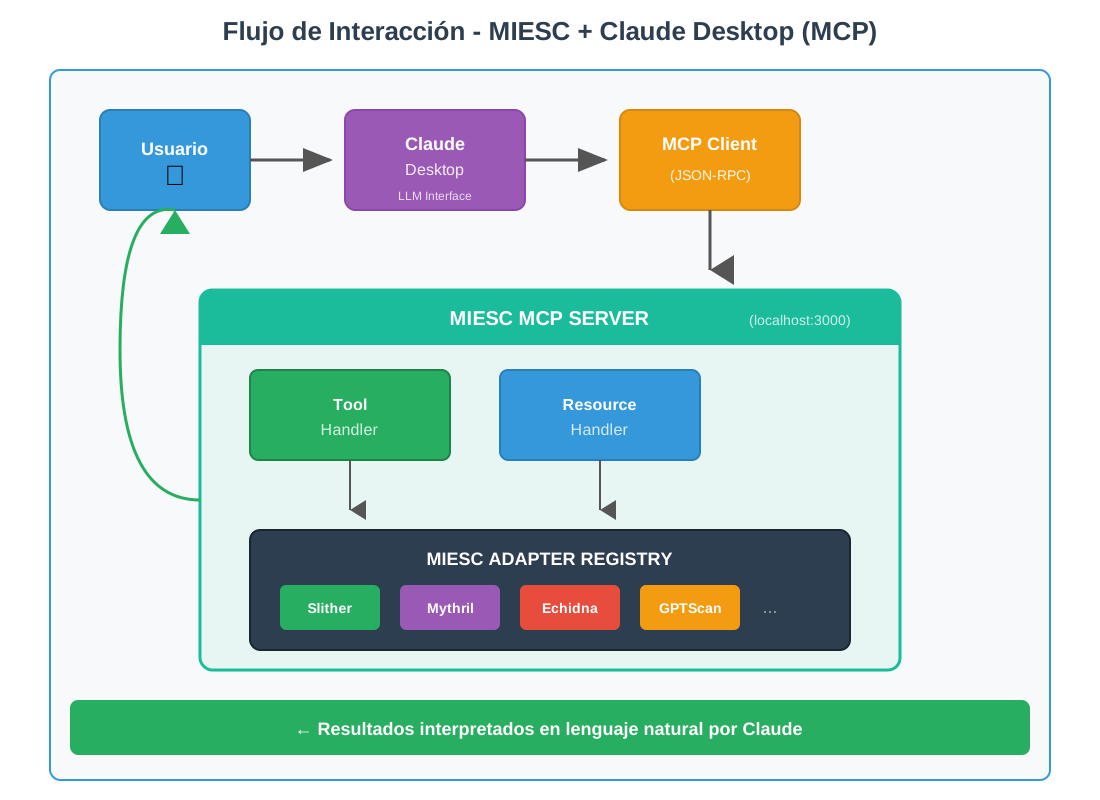
Interaction flow between User, Claude Desktop and MIESC MCP Server
7.3.2 Server Components
1. Tools Handler
The tools handler exposes MIESC capabilities as "tools" invocable by Claude. Each tool is defined with: - Unique and descriptive name - Natural language description of its purpose - JSON schema for input parameters - Execution behavior
class MIESCToolHandler:
    """
    Exposes MIESC tools as MCP tools.

    Design follows the principle that each tool should be
    self-contained and descriptive: Claude should be able to determine
    when and how to use it based solely on its description.
    """

    def get_tools(self) -> list:
        """
        Returns the list of available tools.

        Descriptions are written so Claude understands:
        1. What the tool does
        2. When it's appropriate to use it
        3. What parameters it needs
        """
        return [
            {
                "name": "analyze_contract",
                "description": """Analyze a smart contract for security vulnerabilities
                using MIESC's 7-layer defense-in-depth architecture. This tool runs
                multiple analysis techniques including static analysis (Slither),
                symbolic execution (Mythril), fuzzing (Echidna), and AI-powered
                semantic analysis. Use this tool when the user wants a comprehensive
                security audit of their contract.""",
                "inputSchema": {
                    "type": "object",
                    "properties": {
                        "contract_path": {
                            "type": "string",
                            "description": "Path to the Solidity contract file (.sol)"
                        },
                        "layers": {
                            "type": "array",
                            "items": {"type": "integer", "minimum": 1, "maximum": 7},
                            "description": "Specific layers to execute (1-7). Default: all layers"
                        },
                        "timeout": {
                            "type": "integer",
                            "description": "Maximum time in seconds for analysis. Default: 300"
                        }
                    },
                    "required": ["contract_path"]
                }
            },
            {
                "name": "run_slither",
                "description": """Run Slither static analyzer on a contract. Slither
                is fast (typically <5 seconds) and good for detecting common
                vulnerabilities like reentrancy, unchecked returns, and access
                control issues. Use this for quick initial scans.""",
                "inputSchema": {
                    "type": "object",
                    "properties": {
                        "contract_path": {"type": "string"}
                    },
                    "required": ["contract_path"]
                }
            },
            # ... definitions for all 25 tools
        ]
2. Resources Handler
MCP resources represent data that Claude can query without executing analysis. In MIESC, resources include:
class MIESCResourceHandler:
    """
    Exposes MIESC informational resources.

    Resources allow Claude to access reference information
    (like the SWC database) without running analysis, reducing
    latency for informational queries.
    """

    def get_resources(self) -> list:
        return [
            {
                "uri": "miesc://swc-registry",
                "name": "SWC Registry",
                "description": """Complete Smart Contract Weakness Classification
                database with descriptions, examples, and remediation guidance
                for all known vulnerability types.""",
                "mimeType": "application/json"
            },
            {
                "uri": "miesc://tool-status",
                "name": "Tool Status",
                "description": """Current availability and version information
                for all 25 security tools integrated in MIESC.""",
                "mimeType": "application/json"
            },
            {
                "uri": "miesc://findings/latest",
                "name": "Latest Findings",
                "description": """Results from the most recent security analysis,
                including all detected vulnerabilities and their metadata.""",
                "mimeType": "application/json"
            }
        ]
7.3.3 Detailed Communication Flow
The following sequence diagram illustrates the complete flow of a typical interaction:
Figure 7.2. MCP interaction sequence
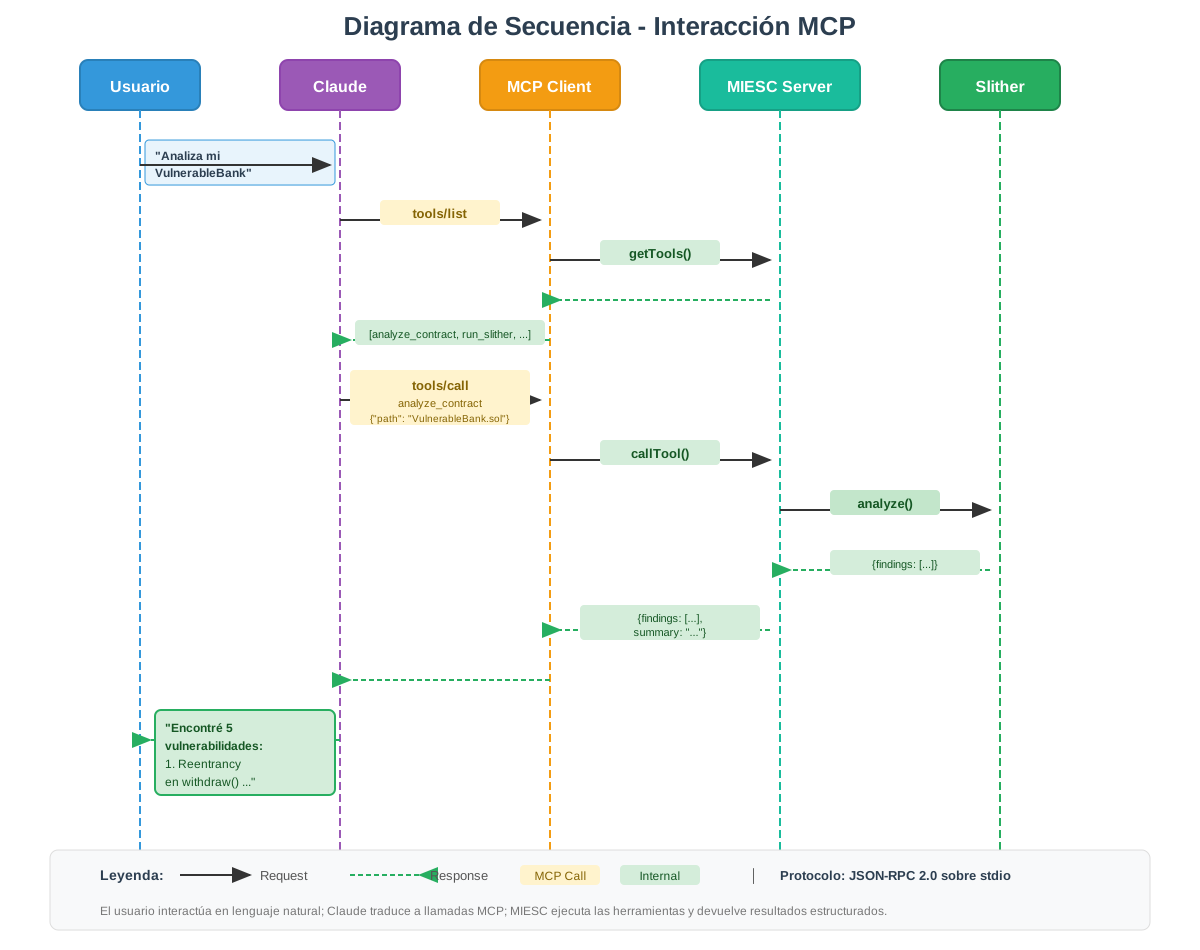
User             Claude              MCP Client           MIESC Server          Slither
   |                   |                    |                     |                   |
   | "Analyze my       |                    |                     |                   |
   |  VulnerableBank"  |                    |                     |                   |
   |------------------>|                    |                     |                   |
   |                   |                    |                     |                   |
   |                   |   tools/list       |                     |                   |
   |                   |------------------>|                     |                   |
   |                   |                    |     getTools()      |                   |
   |                   |                    |------------------->|                   |
   |                   |                    |<-------------------|                   |
   |                   |<------------------|                     |                   |
   |                   |   [analyze_contract, run_slither, ...]   |                   |
   |                   |                    |                     |                   |
   |                   |   tools/call       |                     |                   |
   |                   |   analyze_contract |                     |                   |
   |                   |   {"contract_path":|                     |                   |
   |                   |    "VulnerableBank.sol"}                 |                   |
   |                   |------------------>|                     |                   |
   |                   |                    |    callTool()       |                   |
   |                   |                    |------------------->|                   |
   |                   |                    |                     |                   |
   |                   |                    |                     |   analyze()       |
   |                   |                    |                     |----------------->|
   |                   |                    |                     |<-----------------|
   |                   |                    |                     |   {findings:[...]}|
   |                   |                    |                     |                   |
   |                   |                    |<-------------------|                   |
   |                   |                    |   {findings: [...], |                   |
   |                   |                    |    summary: "..."}  |                   |
   |                   |<------------------|                     |                   |
   |                   |                    |                     |                   |
   |<------------------|                    |                     |                   |
   | "I found 5        |                    |                     |                   |
   |  vulnerabilities: |                    |                     |                   |
   |  1. Reentrancy    |                    |                     |                   |
   |     in withdraw() |                    |                     |                   |
   |  ..."             |                    |                     |                   |
7.4 Technical Implementation
7.4.1 Main MCP Server
# src/mcp/server.py
import asyncio
import logging
from mcp.server import Server
from mcp.server.stdio import stdio_server
from mcp.types import Tool, Resource, TextContent

from src.adapters import register_all_adapters, get_adapter_by_name
from src.mcp.tool_handler import MIESCToolHandler
from src.mcp.resource_handler import MIESCResourceHandler
from src.mcp.security import validate_contract_path, SecurityError

logger = logging.getLogger(__name__)

# MCP server instance
app = Server("miesc-security")
tool_handler = MIESCToolHandler()
resource_handler = MIESCResourceHandler()

@app.list_tools()
async def list_tools() -> list[Tool]:
    """
    List all tools available to Claude.

    This function is invoked when Claude needs to know what
    capabilities it has available. The result determines what
    actions Claude can propose to the user.
    """
    return tool_handler.get_tools()

@app.call_tool()
async def call_tool(name: str, arguments: dict) -> list[TextContent]:
    """
    Execute a MIESC tool.

    Execution process:
    1. Validate the tool exists
    2. Validate input parameters (especially paths)
    3. Execute the corresponding analysis
    4. Format results for Claude
    """
    logger.info(f"Tool invocation: {name} with args {arguments}")

    try:
        if name == "analyze_contract":
            contract_path = arguments.get("contract_path")
            layers = arguments.get("layers", [1, 2, 3, 4, 5, 6, 7])
            timeout = arguments.get("timeout", 300)

            # Critical security validation
            validate_contract_path(contract_path)

            # Execute multi-layer analysis
            results = await run_full_analysis(contract_path, layers, timeout)

            return [TextContent(
                type="text",
                text=format_findings_for_claude(results)
            )]

        elif name.startswith("run_"):
            # Individual tool invocation
            tool_name = name.replace("run_", "")
            adapter = get_adapter_by_name(tool_name)

            if adapter is None:
                raise ValueError(f"Unknown tool: {tool_name}")

            contract_path = arguments.get("contract_path")
            validate_contract_path(contract_path)

            result = await asyncio.to_thread(
                adapter.analyze,
                contract_path,
                timeout=arguments.get("timeout", 60)
            )

            return [TextContent(
                type="text",
                text=format_single_tool_result(result)
            )]

        else:
            raise ValueError(f"Unknown tool: {name}")

    except SecurityError as e:
        logger.warning(f"Security violation in tool call: {e}")
        return [TextContent(
            type="text",
            text=f"Security error: {e}. The requested operation was blocked."
        )]
    except Exception as e:
        logger.error(f"Error in tool execution: {e}", exc_info=True)
        return [TextContent(
            type="text",
            text=f"Analysis failed: {str(e)}"
        )]

@app.list_resources()
async def list_resources() -> list[Resource]:
    """List available informational resources."""
    return resource_handler.get_resources()

@app.read_resource()
async def read_resource(uri: str) -> str:
    """Read resource content."""
    return await resource_handler.read(uri)

async def main():
    """
    MCP server entry point.

    The server uses stdio (standard input/output) for
    communication with the MCP client. This allows Claude
    Desktop to launch the server as a subprocess and communicate
    directly without needing network sockets.
    """
    # Register all tool adapters
    register_all_adapters()

    logger.info("Starting MIESC MCP Server...")

    async with stdio_server() as (read_stream, write_stream):
        await app.run(
            read_stream,
            write_stream,
            app.create_initialization_options()
        )

if __name__ == "__main__":
    logging.basicConfig(level=logging.INFO)
    asyncio.run(main())
7.4.2 Security Validation
Input validation is critical to prevent Claude, inadvertently or through manipulation, from executing unauthorized operations:
# src/mcp/security.py
import os
import re

class SecurityError(Exception):
    """Exception for security violations."""
    pass

# Security configuration
ALLOWED_EXTENSIONS = {'.sol'}
ALLOWED_PATHS = [
    os.path.expanduser("~/contracts"),
    os.path.expanduser("~/projects"),
    "/tmp/miesc"
]
MAX_FILE_SIZE = 1024 * 1024  # 1 MB

def validate_contract_path(path: str) -> bool:
    """
    Validate that the provided path is safe for analysis.

    Verifications performed:
    1. Does not contain path traversal sequences (../)
    2. Allowed file extension (.sol)
    3. Location within authorized directories
    4. File exists and is readable
    5. File does not exceed maximum size

    These verifications prevent:
    - Reading arbitrary system files
    - Executing malicious code packaged as .sol
    - Denial of service attacks via huge files
    """
    # Prevent path traversal
    if ".." in path:
        raise SecurityError("Path traversal detected: '..' not allowed")

    # Normalize and resolve path
    abs_path = os.path.abspath(os.path.expanduser(path))

    # Verify extension
    _, ext = os.path.splitext(abs_path)
    if ext.lower() not in ALLOWED_EXTENSIONS:
        raise SecurityError(f"Extension not allowed: {ext}. Only .sol files accepted")

    # Verify within allowed directory
    in_allowed_path = any(
        abs_path.startswith(os.path.abspath(allowed))
        for allowed in ALLOWED_PATHS
    )
    if not in_allowed_path:
        raise SecurityError(
            f"Path outside allowed directories. "
            f"Allowed: {ALLOWED_PATHS}"
        )

    # Verify existence
    if not os.path.exists(abs_path):
        raise SecurityError(f"File not found: {abs_path}")

    # Verify size
    size = os.path.getsize(abs_path)
    if size > MAX_FILE_SIZE:
        raise SecurityError(
            f"File too large: {size} bytes. "
            f"Maximum: {MAX_FILE_SIZE} bytes"
        )

    return True
7.4.3 Claude Desktop Configuration
For Claude Desktop to recognize the MIESC server, it is configured in the MCP configuration file:
// ~/.config/claude/claude_desktop_config.json (Linux/Mac)
// %APPDATA%\claude\claude_desktop_config.json (Windows)
{
  "mcpServers": {
    "miesc": {
      "command": "python",
      "args": ["-m", "src.mcp.server"],
      "cwd": "/path/to/miesc",
      "env": {
        "PYTHONPATH": "/path/to/miesc",
        "OLLAMA_HOST": "http://localhost:11434"
      }
    }
  }
}
7.5 Use Cases and Interaction Examples
7.5.1 Complete Interactive Audit
The following dialogue illustrates how a developer without security experience can obtain a comprehensive audit:
User: I have a staking contract in contracts/Staking.sol that I need to
      audit before deploying to mainnet. It's my first deploy and
      I want to make sure it has no critical vulnerabilities.

Claude: I will analyze your staking contract with a complete security
        audit. This will run multiple analysis tools including static
        analysis, symbolic execution, and AI-powered semantic analysis.

        [Executes: analyze_contract("contracts/Staking.sol", layers=[1,2,3,5,7])]

        I completed the analysis. I found 8 findings that need your attention:

        CRITICAL (2 - Block deployment):

        1. Reentrancy in unstake() - Line 67
           The contract transfers ETH before updating user balance.
           This allows an attacker to withdraw funds multiple times in a
           single transaction.

           Vulnerable code:
           ```solidity
           function unstake() external {
               uint256 amount = stakes[msg.sender];
               payable(msg.sender).transfer(amount);  // <- Transfer first
               stakes[msg.sender] = 0;                 // <- Update after
           }
           ```

           Impact: An attacker could drain all contract funds.
           Severity: CRITICAL

        2. Precision loss in calculateRewards() - Line 89
           Division is performed before multiplication, causing
           decimal loss that favors the protocol over users.

           Problematic code:
           ```solidity
           uint256 reward = (stakedAmount / totalStaked) * rewardPool;
           ```

           Impact: Users receive less rewards than they deserve,
           especially with small stakes.
           Severity: CRITICAL

        HIGH (3):
        [...]

        Would you like me to show you the corrected code for the critical findings?

User: Yes, show me how to fix the reentrancy problem

Claude: Here is the fix for the reentrancy vulnerability.
        There are two complementary approaches I recommend using together:

        Approach 1: Checks-Effects-Interactions Pattern

        ```solidity
        function unstake() external {
            uint256 amount = stakes[msg.sender];
            require(amount > 0, "Nothing to unstake");

            // EFFECTS: Update state BEFORE external interaction
            stakes[msg.sender] = 0;
            totalStaked -= amount;

            // INTERACTIONS: Transfer after updating state
            (bool success, ) = payable(msg.sender).call{value: amount}("");
            require(success, "Transfer failed");

            emit Unstaked(msg.sender, amount);
        }
        ```

        Approach 2: Add OpenZeppelin ReentrancyGuard (recommended)

        ```solidity
        import "@openzeppelin/contracts/security/ReentrancyGuard.sol";

        contract Staking is ReentrancyGuard {
            function unstake() external nonReentrant {
                uint256 amount = stakes[msg.sender];
                require(amount > 0, "Nothing to unstake");

                stakes[msg.sender] = 0;
                totalStaked -= amount;

                (bool success, ) = payable(msg.sender).call{value: amount}("");
                require(success, "Transfer failed");

                emit Unstaked(msg.sender, amount);
            }
        }
        ```

        I recommend using both approaches: the CEI pattern as coding
        practice and ReentrancyGuard as additional defense. Defense
        in depth is especially important when funds are at stake.

        Would you like me to analyze the contract again after you make
        corrections to verify they're correct?
7.5.2 Contextual Documentation Query
User: What is SWC-107 and why is it so dangerous?

Claude: [Executes: read_resource("miesc://swc-registry")]

        SWC-107: Reentrancy

        Description:
        A reentrancy vulnerability occurs when a contract makes an
        external call to another contract before updating its own
        state. The external contract can then "re-enter" the
        original function before the first execution finishes.

        Why it's dangerous:

        1. Devastating financial impact: The DAO attack in 2016 exploited
           exactly this vulnerability, resulting in the loss of
           $60 million dollars and causing an Ethereum fork.

        2. Difficult to detect manually: The execution flow is
           counter-intuitive. The code "looks fine" because operations
           are in logical order, but actual execution order is different.

        3. Easy to exploit: Once identified, the vulnerability can
           be exploited with a relatively simple attacker contract.

        Vulnerable pattern:
        ```
        function withdraw() {
            uint balance = balances[msg.sender];
            msg.sender.call{value: balance}("");  // <- Attacker re-enters here
            balances[msg.sender] = 0;              // <- Never executes until the end
        }
        ```

        Notable historical incidents:
        - The DAO (2016): $60M lost, Ethereum fork
        - Cream Finance (2021): $130M lost
        - Rari Capital (2022): $80M lost

        This vulnerability remains one of the most exploited in DeFi
        because it's easy to introduce accidentally and traditional
        tools don't always detect it in complex contexts.
7.6 Demonstrated Benefits
7.6.1 Friction Reduction
Table 7.1. Workflow comparison
| Task | Without MCP (traditional CLI) | With MCP (Claude) |
|---|---|---|
| Audit contract | 5 commands, 10+ minutes | 1 message, 2 minutes |
| Interpret findings | Manual, requires expertise | Contextual explanation |
| Get remediation | Search external documentation | Corrected code in-situ |
| Second opinion | Run another tool | "Confirm with Mythril" |
| Generate report | Custom script | "Generate an executive report" |
7.6.2 Access Democratization
The MCP model allows developers without specific smart contract security training to:
-
Understand vulnerabilities in their context: Claude explains not only what's wrong but why it matters and what could happen.
-
Receive specific remediation guidance: Instead of generic documentation, they get corrected code for their particular case.
-
Learn while working: Each interaction is a learning opportunity about smart contract security.
-
Validate corrections: They can verify their changes effectively resolve the detected problem.
7.7 Limitations and Considerations
7.7.1 Technical Limitations
| Limitation | Impact | Mitigation |
|---|---|---|
| Claude dependency | Only works with Claude Desktop/Code | REST API as fallback |
| Recent protocol (2024) | Possible specification changes | Abstraction in handlers |
| Analysis latency | Waits during long analyses | Progress streaming |
| Limited Claude context | Very large contracts may truncate | Intelligent chunking |
7.7.2 Security Considerations
1. The MCP server should only listen on localhost:
# Secure configuration
MCP_CONFIG = {
    "host": "127.0.0.1",
    "transport": "stdio"  # Preferred over TCP
}

# INSECURE configuration - NEVER do this:
# MCP_CONFIG = {"host": "0.0.0.0", "port": 3000}
2. Always validate input paths to prevent access to files outside authorized scope.
3. Limit execution resources (time, memory) to prevent denial of service.
4. Maintain audit logs of all invocations for traceability.
7.8 Conclusions
7.8.1 Justification Summary
The MCP server implementation in MIESC addresses a real and significant problem: the gap between the sophistication of security analysis tools and their accessibility for typical developers. MCP enables closing this gap by providing a conversational interface that:
-
Reduces entry barrier: Developers can access professional security analysis without learning specific commands or interpreting cryptic technical output.
-
Maintains data sovereignty: All processing occurs locally, without transmitting source code to external services.
-
Leverages existing intelligence: Claude contributes explanation, contextualization, and guidance capabilities that individual tools cannot provide.
-
Is extensible and open: Based on an open specification, it does not create dependency on a specific vendor.
7.8.2 MIESC Positioning
The combination of 25 security tools, sovereign LLM (Ollama), and conversational interface (MCP) positions MIESC as:
A smart contract security framework with native conversational AI integration, whose server and tools run on the user's infrastructure and which offers a fully local analysis mode.
As far as the review in Chapter 3 reaches, this combination has no direct equivalent in the blockchain security ecosystem, where alternatives require sending code to external services, have significant costs, or lack accessible interfaces for non-specialists.
7.9 Chapter References
Anthropic. (2024). Model Context Protocol Specification. https://modelcontextprotocol.io/
Anthropic. (2024). MCP Servers Documentation. https://modelcontextprotocol.io/
Beller, M., Bholanath, R., McIntosh, S., & Zaidman, A. (2016). Analyzing the state of static analysis: A large-scale evaluation in open source software. In 2016 IEEE 23rd International Conference on Software Analysis, Evolution, and Reengineering (SANER) (pp. 470-481). IEEE. https://doi.org/10.1109/SANER.2016.105
OWASP. (2023). Smart Contract Security Testing Guide. https://owasp.org/
Note: References follow APA 7th edition format. Document updated: 2025-11-29